
What Is a Douglas County Court Docket
A docket is the court's official running list of events for a case. Each line on a Douglas County docket records one event, such as a filing, a notice, an order, a hearing, or a ruling. The docket shows when the event happened, who filed it, and what type of action it was. Think of the docket as the table of contents for a case. The pleadings and orders themselves sit in the case file. The docket just tells you what is there and when it landed.
For court calendars, the docket is also a daily schedule. The Colorado Judicial Branch posts a public docket for each Douglas County courtroom at the Justice Center. The docket lists every case set to be heard that day, with hearing type, courtroom, and time. People use it to track an upcoming court date, to find a missing case number, or to see which judge is hearing a matter.
Douglas County has two trial courts at the same building: Douglas County District Court and Douglas County Court. District Court hears felonies, civil cases above the County Court limit, domestic relations, juvenile, probate, and mental health matters. County Court hears misdemeanors, traffic, small claims, and county civil cases within statutory limits. Each court publishes its own docket. The state docket search lets users pull either or both, by county and date.
Municipal court dockets are not on the state system. Castle Rock, Parker, and Lone Tree each run their own municipal courts for city ordinance violations. Those dockets are handled by the city or town, not by the 23rd Judicial District.
How to Find Douglas County Dockets Online
The fastest path to a Douglas County docket is the Colorado Judicial Branch docket search at coloradojudicial.gov/dockets. The tool covers every county on the state court system, and Douglas County dockets show up under the 23rd Judicial District. The search runs by date, county, and court type, with optional fields for party name, case number, or attorney bar number. Results pull straight from the court calendar feed, so they update as the clerk sets and resets hearings.
A page on the same site shows what the docket search interface looks like before a query is run. The screenshot below is the live entry screen.
The screenshot is sourced from the Colorado Judicial Branch docket search.
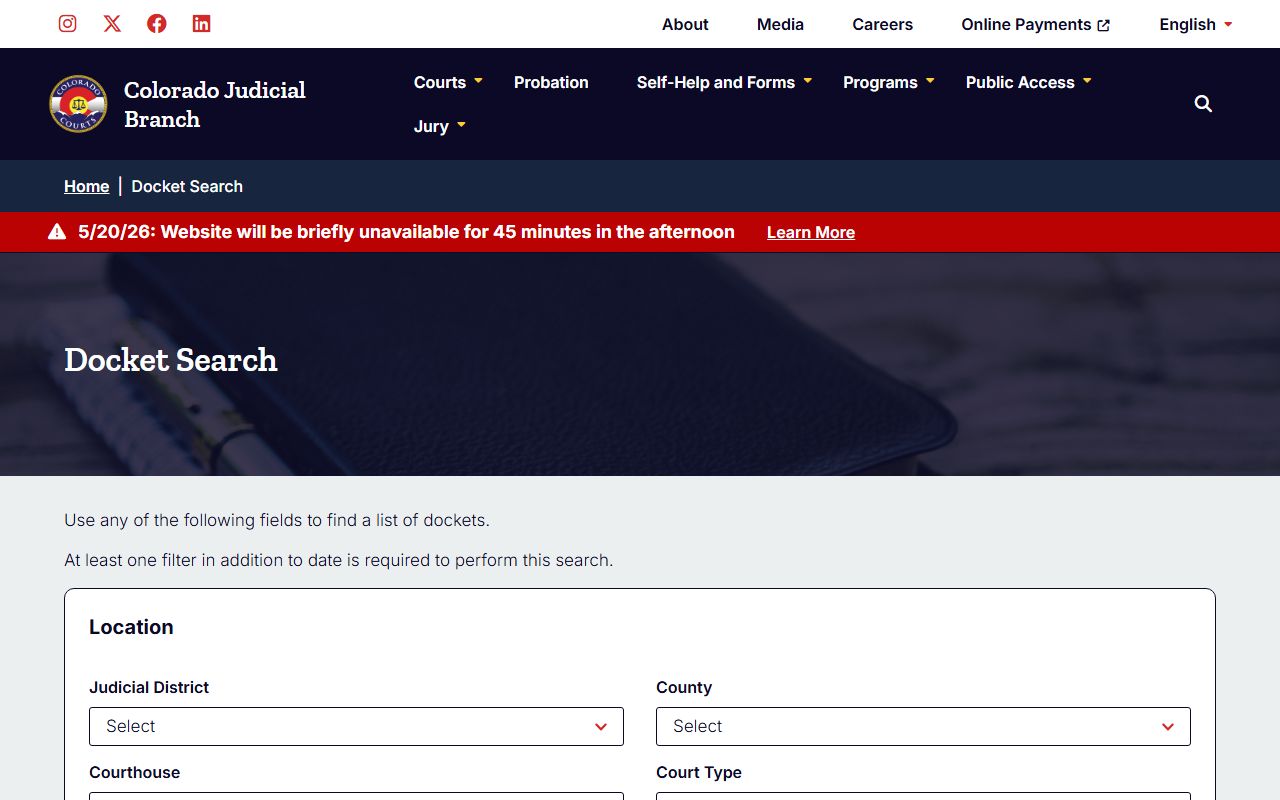
The form lets a user select Douglas County, pick a date range, and filter by court before running the search. Results return one row per scheduled hearing.
- Open the docket search page at coloradojudicial.gov/dockets and accept the public access notice if one is shown.
- Select Douglas County from the county dropdown. The tool will then load the courts that publish dockets for the 23rd Judicial District.
- Pick a date or a short date range. Most users start with the day of court or the next two weeks.
- Choose the court type if known: District Court for felony, civil, domestic, probate, or juvenile, or County Court for misdemeanor, traffic, small claims, and county civil.
- Add a party name or case number to narrow results. The case number field takes the full Colorado format if known.
- Click Search. Review the result list for case number, caption, hearing time, courtroom, and hearing type.
If the case does not show up, the matter may be too new to display, sealed, in a municipal court, in another county, or set under a name spelling that does not match. Try a date range search and a partial last name.
Sample Douglas County Docket Entry
Each line of a Douglas County docket carries a fixed set of fields. The state system pulls the same data points for every case, so once a user can read one docket, the rest follow the same layout. The table below maps the visible fields to what each one tells the reader.
| Field | What It Shows |
|---|---|
| Case Number | Colorado case number that combines filing year, case class code, and a sequence number. Class codes include CR for criminal, CV for civil, DR for domestic relations, JV for juvenile, PR for probate, M for misdemeanor, T for traffic, and S for small claims. |
| Case Caption | Parties or abbreviated party names. People v. defendant for criminal, petitioner and respondent for family, plaintiff and defendant for civil, or estate name for probate. |
| Court | Douglas County District Court or Douglas County Court at 4000 Justice Way, Castle Rock. |
| Division or Courtroom | The courtroom or judicial division assigned to the case when it has been set. |
| Hearing Date | The date the event is scheduled, in public calendar format. |
| Hearing Time | Start time as posted by the court. Many dockets cluster events at 8:30 a.m. or 1:30 p.m. |
| Hearing Type | The kind of court event, such as advisement, arraignment, return, motions, disposition, trial setting, review, sentencing, status conference, or permanent orders. |
| Judge or Magistrate | The judicial officer assigned to the courtroom or matter, when listed on the docket output. |
| Documents | Not shown. The docket search does not return full document images. Filed pleadings must be requested from the clerk. |
| Redactions | Juvenile, sealed, suppressed, victim safety, or other confidential matters may be removed or shown only with limited information. |
A typical docket line reads case number, parties, hearing time, courtroom, hearing type. A reader can scan a Douglas County calendar in a few minutes once the fields make sense.
Courts That Publish Dockets in Douglas County
Not every court in Douglas County feeds the state docket page. The Colorado Judicial Branch posts dockets for the trial courts it runs. Municipal courts run by Castle Rock, Parker, and Lone Tree are city courts. They publish their own calendars on city or town sites, not on the state system. Federal cases that arise in Douglas County are filed at the U.S. District Court for the District of Colorado in Denver and post on PACER, which is a separate paid system.
- Douglas County District Court at the Justice Center, 4000 Justice Way, Castle Rock. Dockets cover felonies, civil cases, domestic relations, juvenile, probate, and mental health.
- Douglas County Court at the same Justice Center address. Dockets cover misdemeanors, traffic, small claims, county civil matters, and protection orders.
- 23rd Judicial District court calendars on the Colorado Judicial Branch docket page. The 23rd Judicial District covers Douglas, Elbert, and Lincoln counties.
- Castle Rock Municipal Court. Town ordinance dockets are on the Town of Castle Rock site, not the state system.
- Parker Municipal Court and Lone Tree Municipal Court. Each city handles its own ordinance dockets through the city court office.
- U.S. District Court for the District of Colorado for federal matters. Federal dockets are on PACER and are not on the state Judicial Branch page.
For the most complete view of state cases, pull the Douglas County docket by date and leave the court type field open. The result will show both District and County Court hearings for the day.
Docket vs. Full Case Record
A docket and a full case record are not the same thing. The docket is a list of events. The case file is the documents themselves. A user who needs to read a motion, an order, a judgment, or a divorce decree will need the case file, not just the docket. The case file is requested from the Douglas County Combined Courts clerk using the Colorado record request form JDF 4. Some files are public, some are restricted, and some are sealed.
| Docket | Full Case Record | |
|---|---|---|
| Format | List of dated entries and events | Filed documents, orders, exhibits |
| Access | Public, online, free at coloradojudicial.gov/dockets | Clerk request, possible fee, possible counter visit |
| Detail | Hearing date, time, courtroom, hearing type | Full text of motions, orders, judgments, decrees |
| Use | Track case progress and upcoming hearings | Legal review, evidence, certified copies, appeals |
| Form Needed | None | JDF 4 record request to the court clerk |
| Redactions | Confidential cases removed or limited | Personal identifiers and protected content redacted |
Note: For a divorce decree, name change order, probate letters, or sentencing order, request a certified copy from the Douglas County Combined Courts clerk.
Common Hearing Types on a Douglas County Docket
Hearing types tell the reader what is going to happen at court. A first appearance is very different from a sentencing, and a trial setting is not a trial. The labels are short. Learning a few of them makes a docket easier to scan.
| Hearing Type | What Happens |
|---|---|
| Advisement | The court explains the rights and the charges. Used in criminal and some protection matters. |
| Arraignment | The defendant enters a plea to a criminal charge. |
| Return | A return of service or warrant return is reviewed. |
| Motions | The court hears written requests from a party, such as motions to suppress or motions to continue. |
| Disposition | A plea, dismissal, or other resolution is entered. |
| Trial Setting | The court sets the date for trial. No evidence is heard at this short hearing. |
| Review | The court checks on probation, payment, treatment, or compliance. |
| Sentencing | The court imposes a sentence after conviction or plea. |
| Status Conference | Used in civil and domestic cases to check progress and set next steps. |
| Permanent Orders | Final orders hearing in a divorce or allocation of parental responsibilities case. |
| Probate Hearing | Estate, guardianship, or conservatorship matter set in District Court. |
A docket may list more than one hearing type per day in the same courtroom. Block scheduling is common in Douglas County for advisements and short matters.
How to Read a Douglas County Docket Line
Docket entries use short codes and abbreviations to save space. Case class codes are the first clue. CR is criminal, CV is civil, DR is domestic relations, JV is juvenile, PR is probate, M is misdemeanor, T is traffic, and S is small claims. A case captioned 2024CR123 is a 2024 District Court criminal case. A case captioned 2024T456 is a 2024 County Court traffic case. The case class tells the user which court and which set of rules apply.
Disposition labels show how a case ended or the current status. Common ones include open, closed, dismissed, dismissed with prejudice, dismissed without prejudice, plea, guilty, not guilty, deferred judgment, deferred sentence, sealed, suppressed, stayed, inactive, and transferred. A line that shows "dismissed with prejudice" means the matter is over and generally cannot be refiled. A line that shows "sealed" means the public access has been restricted by court order.
If a docket line shows a courtroom but no judge, the assignment may still be pending. If a line shows no time, the hearing may be by submission, vacated, or moved to chambers. When a hearing has been reset, the docket usually keeps the old line and adds a new one with the new date.
Douglas County Combined Courts Contact
Docket questions, hearing confirmations, and record requests are handled by the Douglas County Combined Courts clerk at the Justice Center. The clerk can confirm a docket setting, look up a case number by party name, and accept a JDF 4 record request for case documents.
Douglas County Combined Courts
Douglas County Justice Center
4000 Justice Way
Castle Rock, CO 80109
Phone: 720-437-6200
Court phone lines tend to run busiest near the start and end of the business day. Mid-morning or mid-afternoon calls often connect faster. Walk-in counter service is available at the Justice Center for users who need same-day help with a docket or case file.